
Modernizing Contour’s driver software
from technical to user-friendly
Live Product
Project Overview
Redesigned Contour Design’s configuration drivers for ergonomic products, transforming outdated UIs into intuitive, user-friendly experiences aligned with modern design standards and brand identity.
About Contour Design
Contour Design is a market leader in ergonomic computer peripherals, with a mission to reduce physical strain and improve productivity for professionals who spend long hours at their desks..
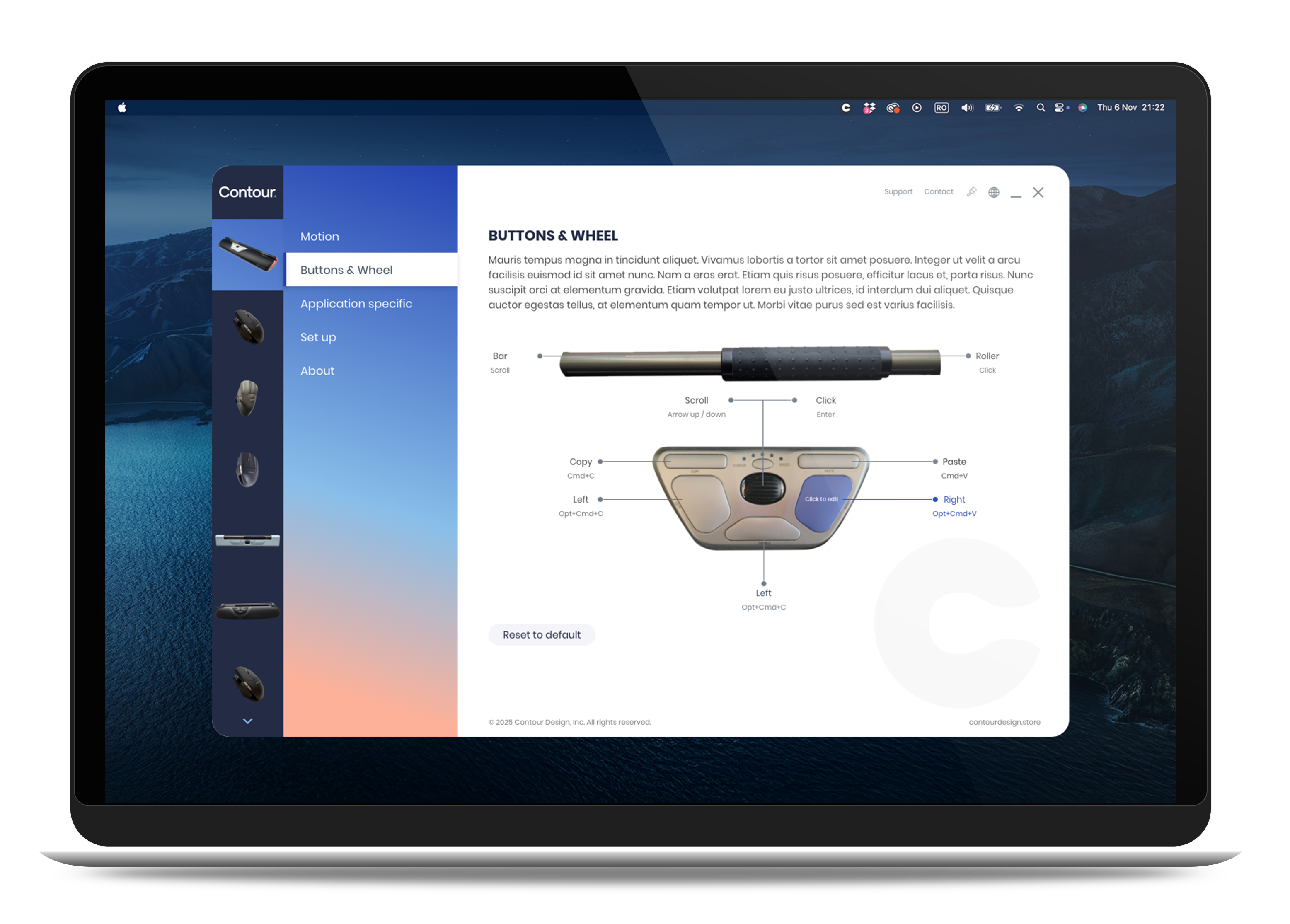
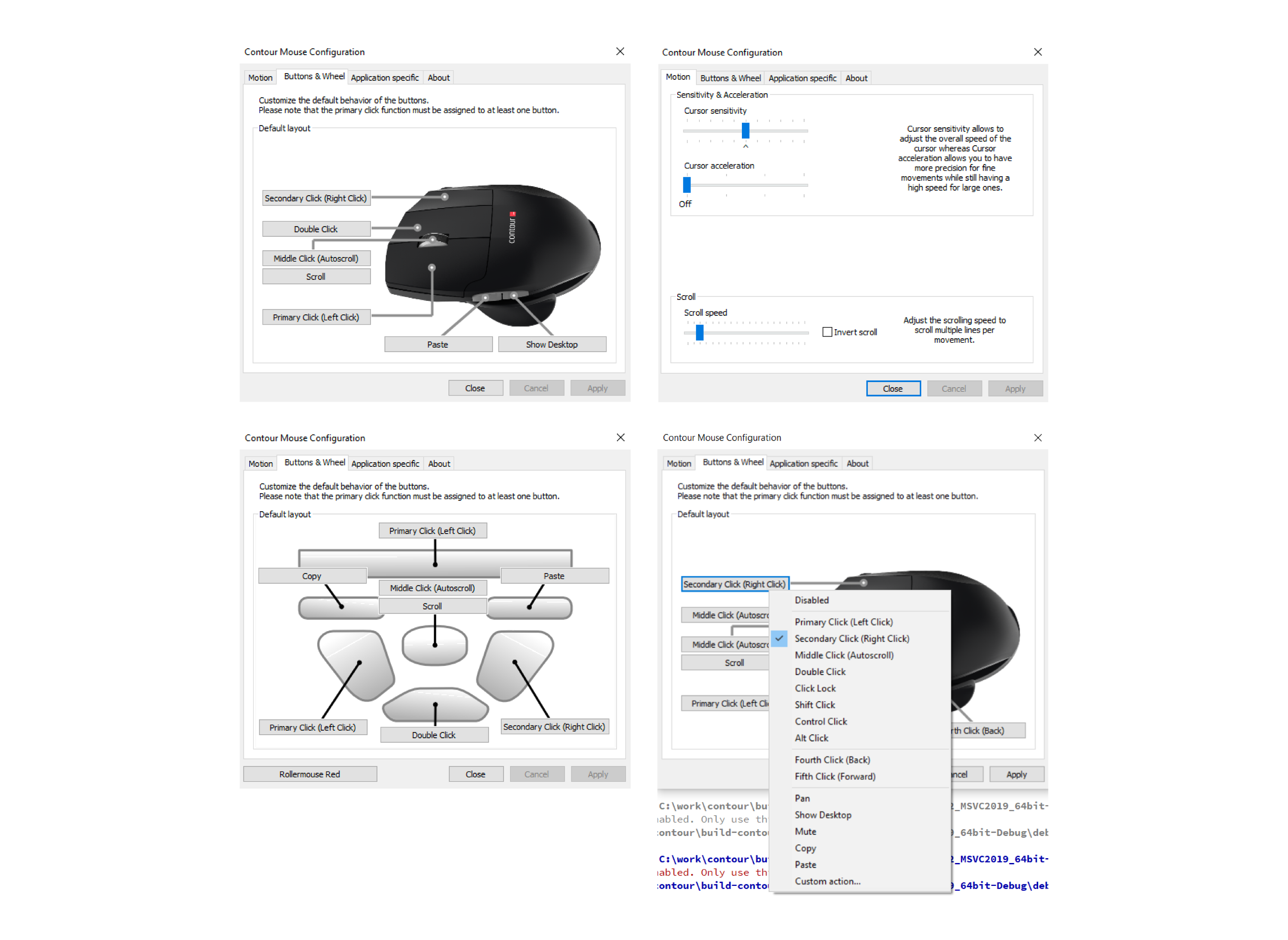
Before & After - Contour Mouse Configuration

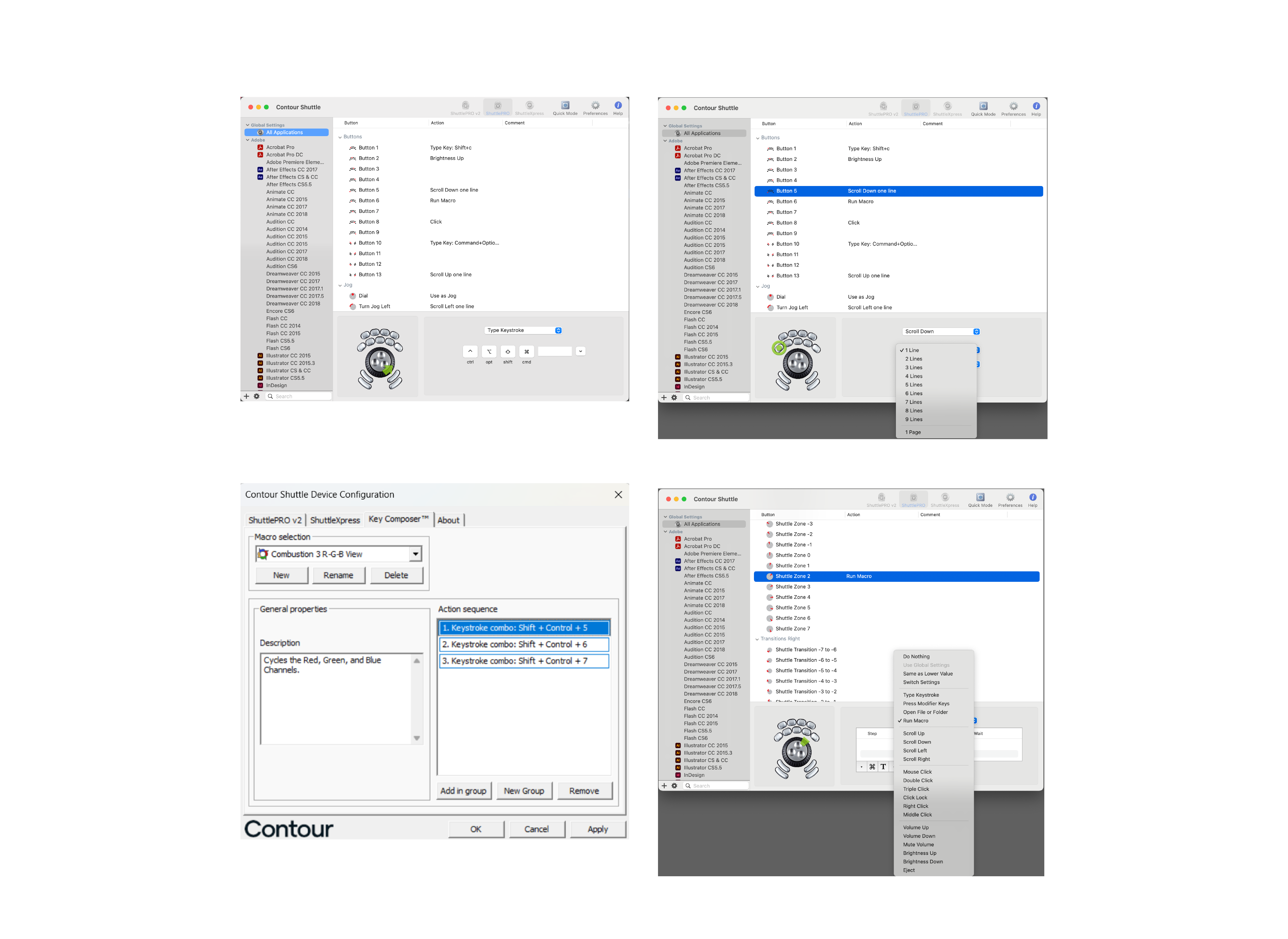
Before & After - Contour Shuttle
My role
Lead Product Designer: UI/UX redesign, prototyping, usability testing.
- Collaboration: Worked closely with devs to align design with technical constraints.
- Testing: Validated designs using physical devices (UniMouse, RollerMouse, the Controllers).
The Challenge
- Outdated UI: cluttered, unintuitive.
- Profile Management: Needed to enable specific profiles for all the products.
- Rebranding (2024, 2025): Adapted UI to new brand colors and visual identity.
THE PROCESS
Initial Research & Assumptions
- Started with limited information, so I made educated assumptions about user needs and workflows.
- Collaborated closely with the development team to validate these assumptions and refine the user flow.
Hands-On Testing
- Contour provided two physical mice (RollerMouse and Unimouse), which I used to test interactions firsthand.
- This real-world testing helped me identify pain points and refine the interface based on actual user experience.
Design & Iteration
- Created high-fidelity UI, ensuring alignment with Contour’s brand guidelines.
- Focused on intuitive navigation, visual clarity, and consistency across macOS, primarly.
- New update in 2025 to match Contour’s new brand identity.
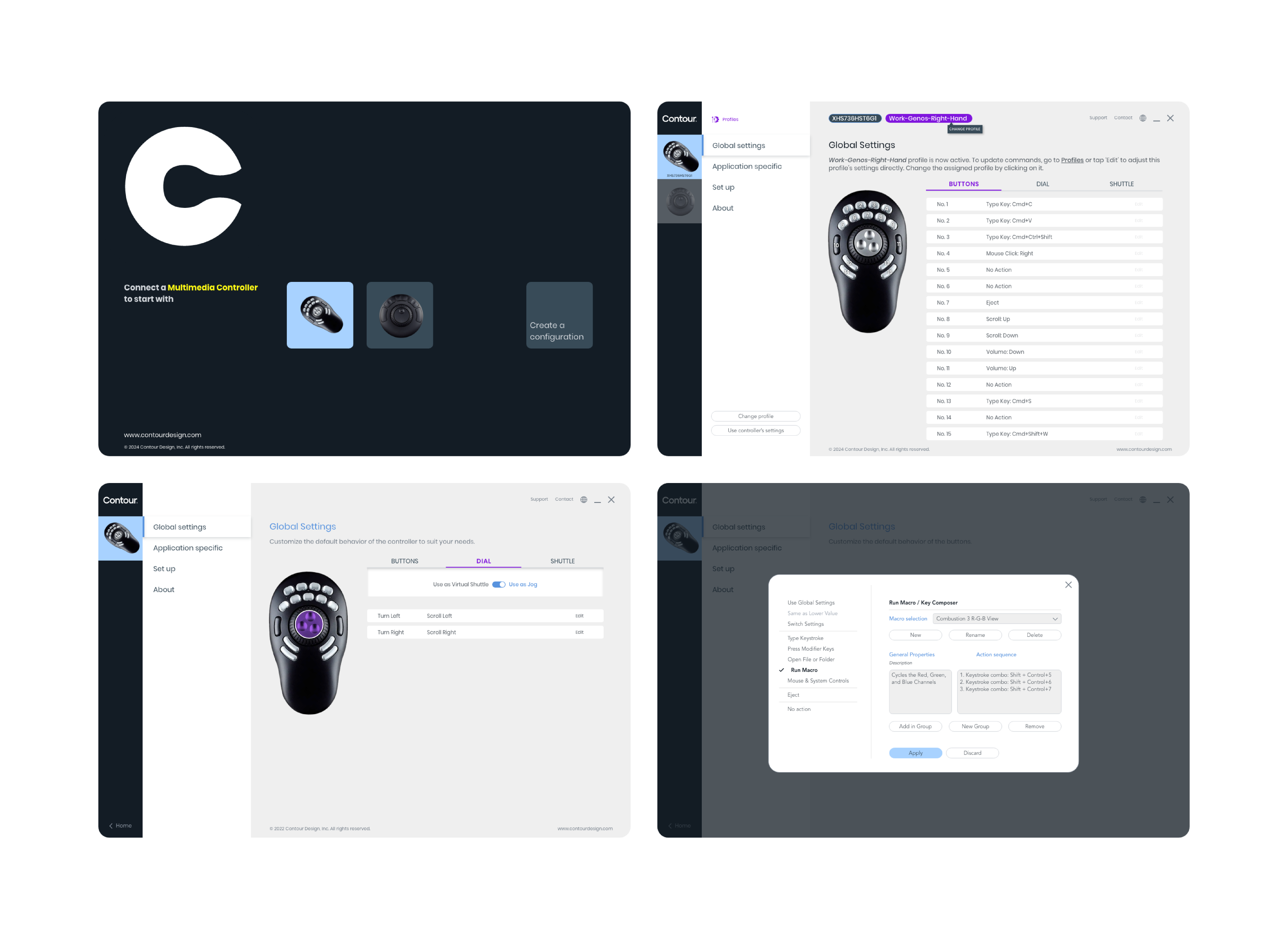
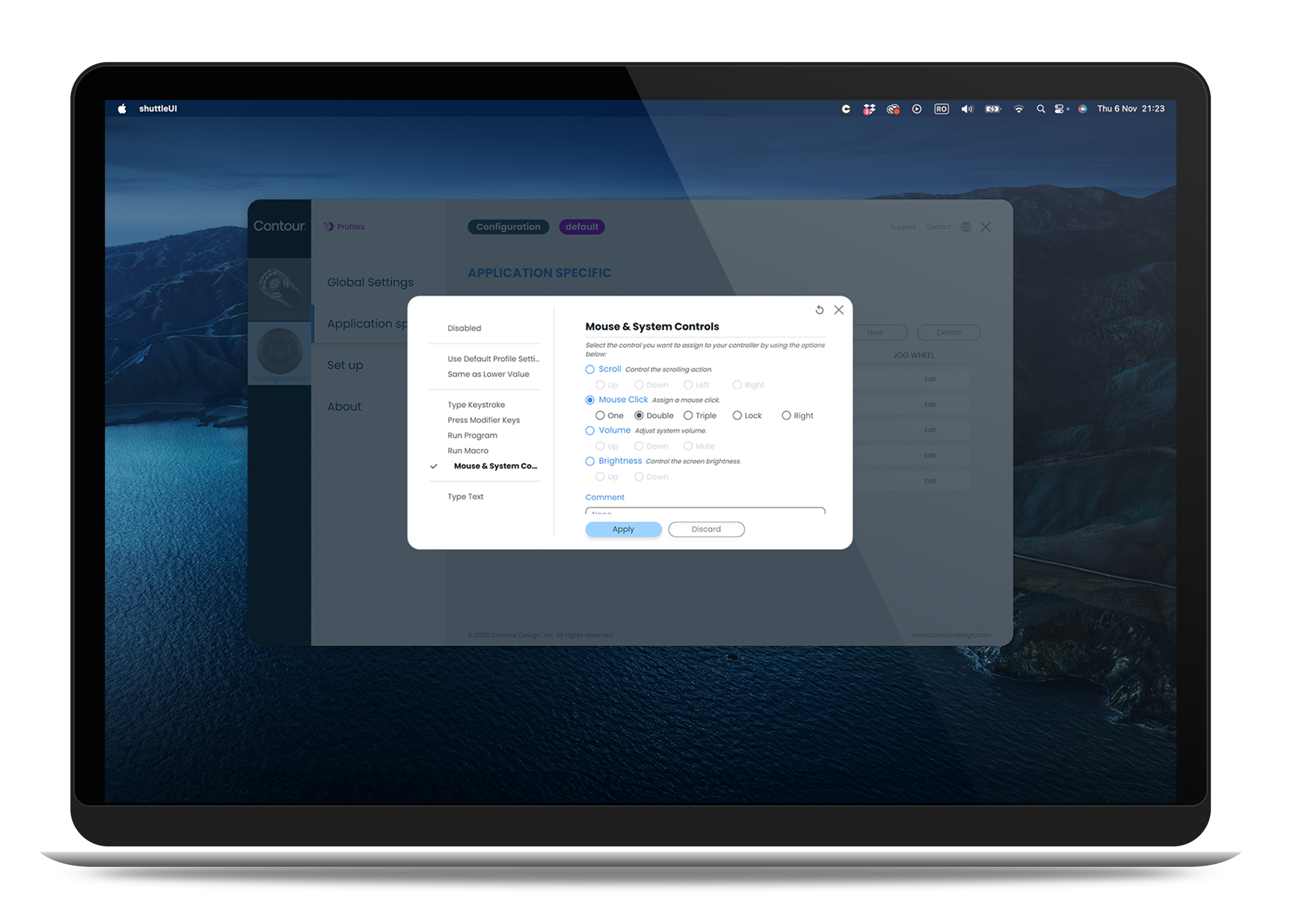
Enables users to create and switch between app-specific profiles, allowing the Multimedia Controller to adapt its behavior, such as button mappings and sensitivity, for different applications (Photoshop, Excel, video editing software).
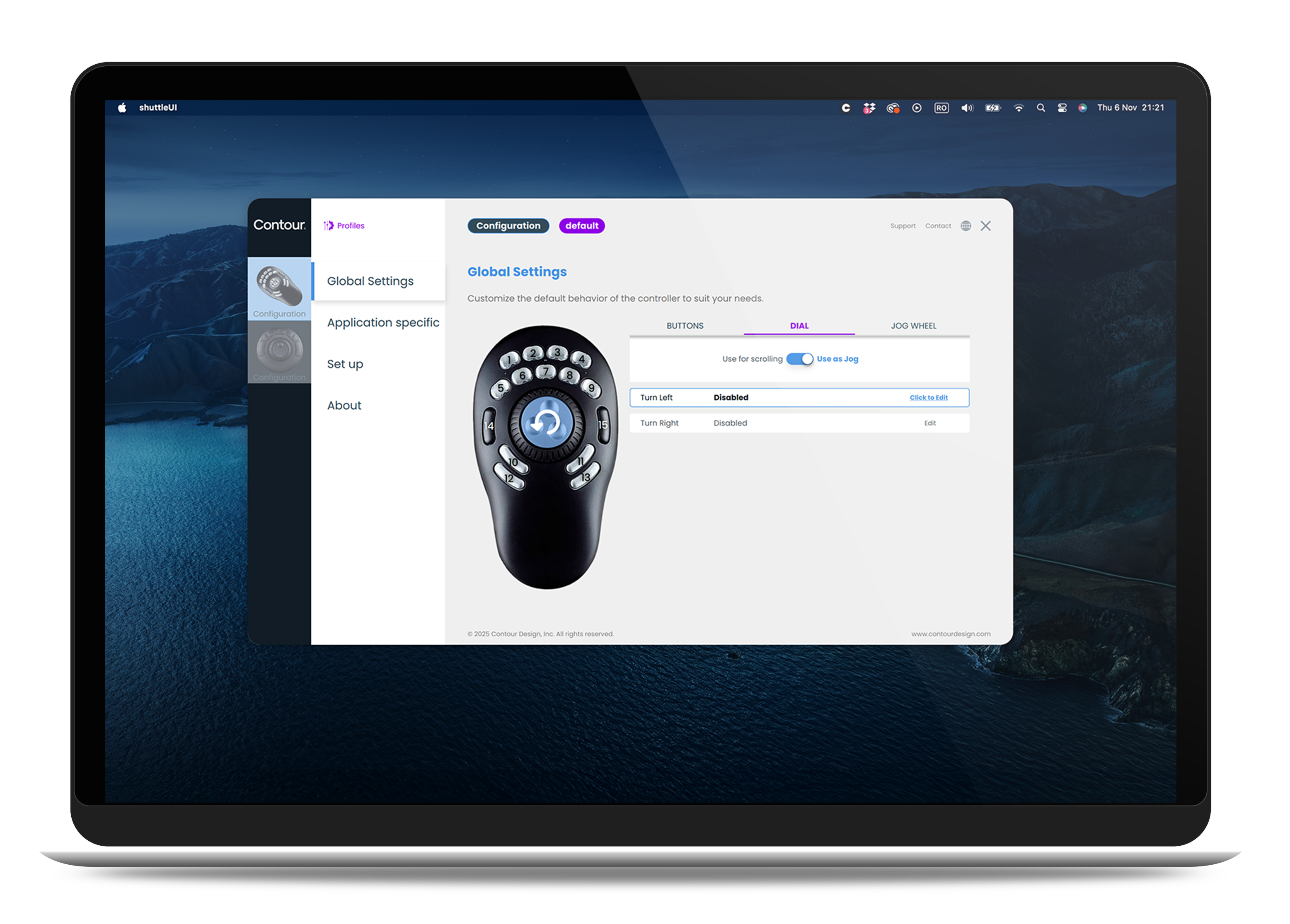
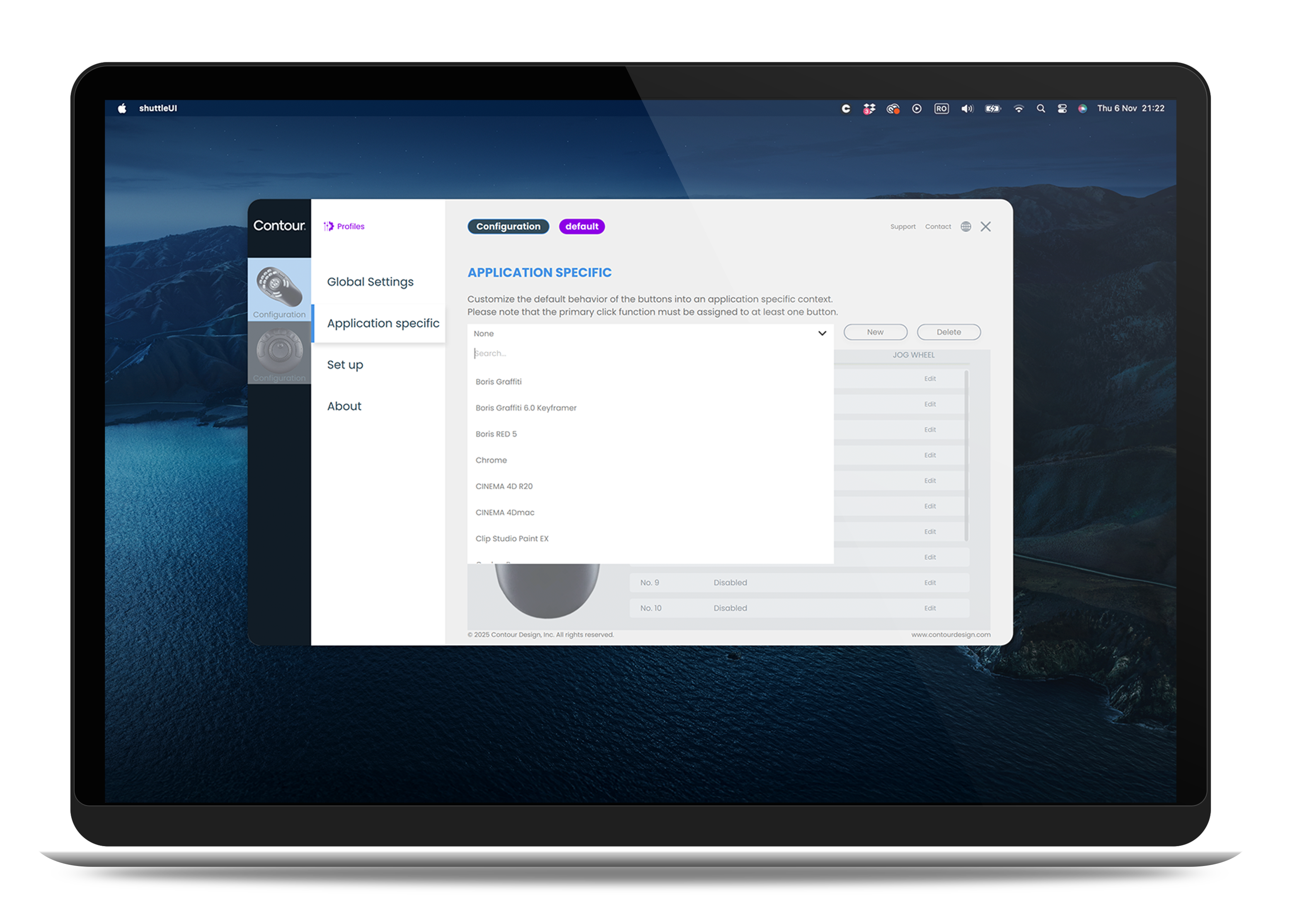
This eliminates the need for manual reconfiguration, saving time and reducing frustration. Users can seamlessly transition between workflows, boosting productivity and ensuring a smoother experience.

Outcome
- Improved Usability: Clean, intuitive navigation and visual hierarchy, making advanced settings accessible to all users.
- Profile Customization: Seamless switching between app-specific settings.
- Brand Alignment: Updated UI to reflect Contour’s modern identity, while maintaining technical performance.
Key takeaways
- Humanity-Centered Design: Focused on real user needs, not just technical specifications.
- Collaboration: Worked closely with developers to balance design goals with system constraints.
- Adaptability: Integrated rebranding updates without compromising driver functionality.
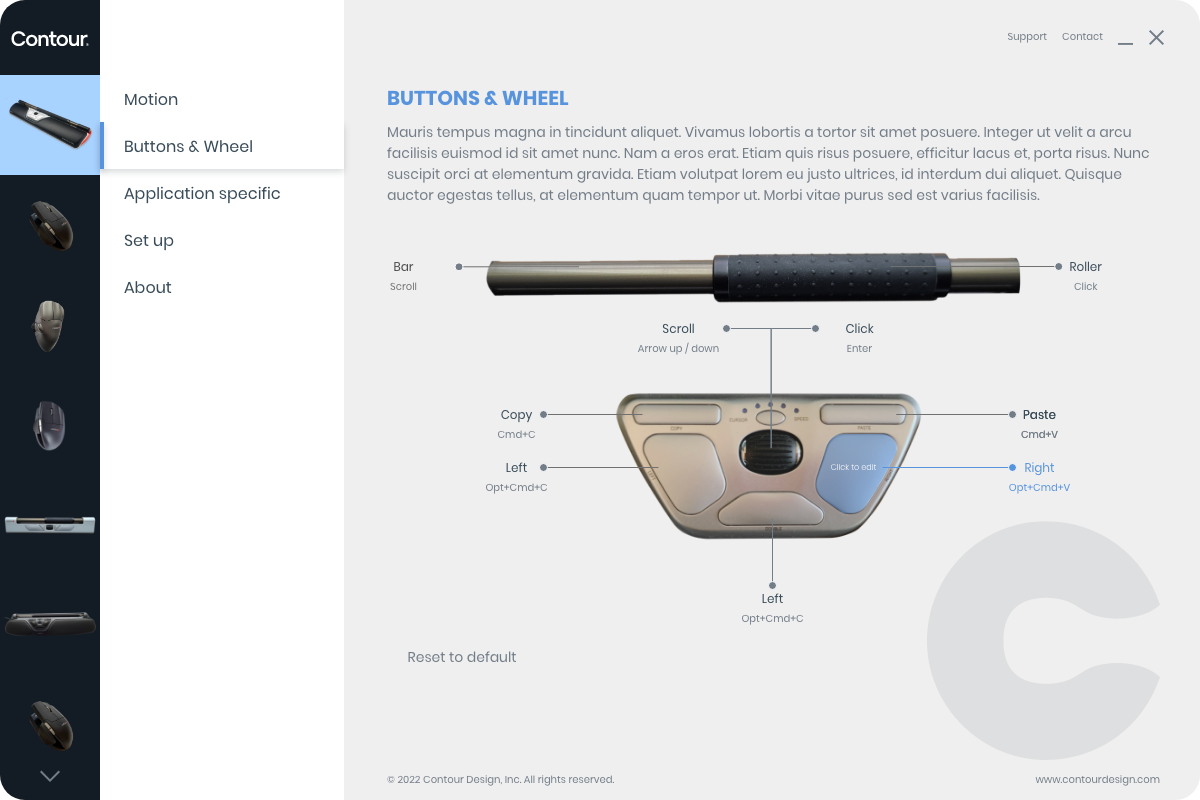
Original app: the starting point - a cluttered interface with outdated visuals and inconsistent branding. These challenges drove the need for a complete redesign.
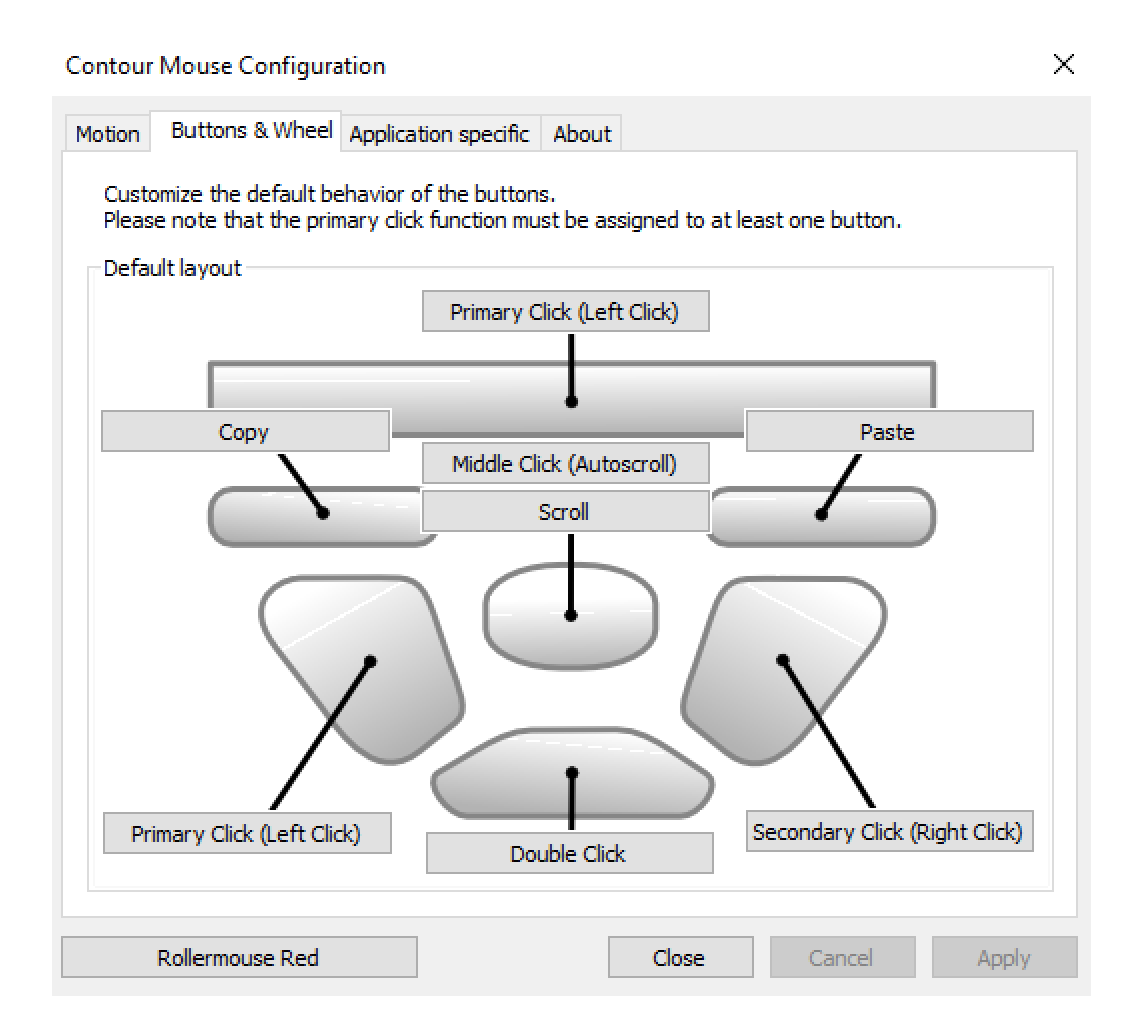
The redesign: a modern, user-centered interface with streamlined navigation, intuitive controls, and app-specific profiles for seamless workflow adaptation.
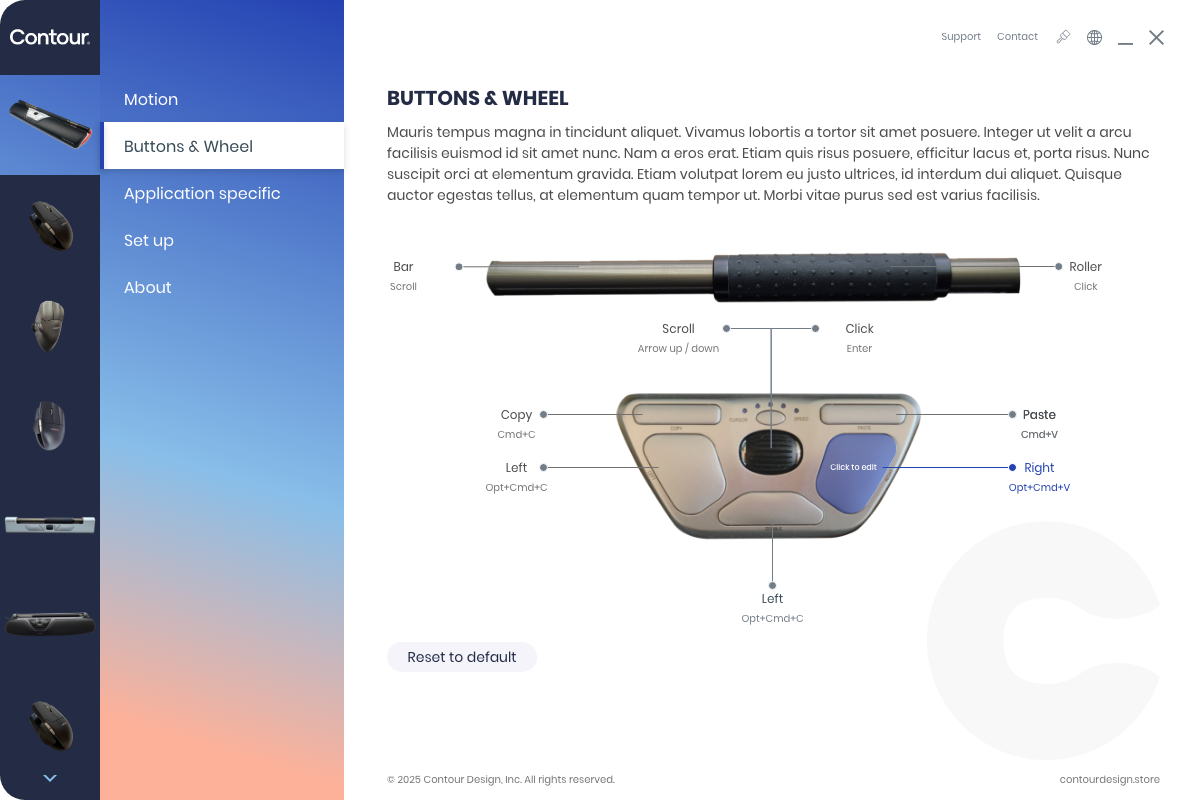
2025, Rebranding update: updated color palette, maintaining the app’s usability while aligning with Contour Design’s refreshed brand guidelines.
The driver redesign transformed a technical barrier into a seamless experience. By focusing on clarity and usability, I ensured that even advanced settings became intuitive - proving that good design can make complex tasks feel simple.
Modernizing Contour’s driver software
from technical to user-friendly
Live Product
Project Overview
Redesigned Contour Design’s configuration drivers for ergonomic products, transforming outdated UIs into intuitive, user-friendly experiences aligned with modern design standards and brand identity.
About Contour Design
Contour Design is a market leader in ergonomic computer peripherals, with a mission to reduce physical strain and improve productivity for professionals who spend long hours at their desks..
Before & After - Contour Mouse Configuration
Before & After - Contour Shuttle
My role
Lead Product Designer: UI/UX redesign, prototyping, usability testing.
- Collaboration: Worked closely with devs to align design with technical constraints.
- Testing: Validated designs using physical devices (UniMouse, RollerMouse, the Controllers).
The Challenge
- Outdated UI: cluttered, unintuitive.
- Profile Management: Needed to enable specific profiles for all the products.
- Rebranding (2024, 2025): Adapted UI to new brand colors and visual identity.
THE PROCESS
Initial Research & Assumptions
- Started with limited information, so I made educated assumptions about user needs and workflows.
- Collaborated closely with the development team to validate these assumptions and refine the user flow.
Hands-On Testing
- Contour provided two physical mice (RollerMouse and Unimouse), which I used to test interactions firsthand.
- This real-world testing helped me identify pain points and refine the interface based on actual user experience.
Design & Iteration
- Created high-fidelity UI, ensuring alignment with Contour’s brand guidelines.
- Focused on intuitive navigation, visual clarity, and consistency across macOS, primarly.
- New update in 2025 to match Contour’s new brand identity.
Enables users to create and switch between app-specific profiles, allowing the Multimedia Controller to adapt its behavior, such as button mappings and sensitivity, for different applications (Photoshop, Excel, video editing software).
This eliminates the need for manual reconfiguration, saving time and reducing frustration. Users can seamlessly transition between workflows, boosting productivity and ensuring a smoother experience.
Outcome
- Improved Usability: Clean, intuitive navigation and visual hierarchy, making advanced settings accessible to all users.
- Profile Customization: Seamless switching between app-specific settings.
- Brand Alignment: Updated UI to reflect Contour’s modern identity, while maintaining technical performance.
Key takeaways
- Humanity-Centered Design: Focused on real user needs, not just technical specifications.
- Collaboration: Worked closely with developers to balance design goals with system constraints.
- Adaptability: Integrated rebranding updates without compromising driver functionality.
Original app: the starting point - a cluttered interface with outdated visuals and inconsistent branding. These challenges drove the need for a complete redesign.
The redesign: a modern, user-centered interface with streamlined navigation, intuitive controls, and app-specific profiles for seamless workflow adaptation.
2025, Rebranding update: updated color palette, maintaining the app’s usability while aligning with Contour Design’s refreshed brand guidelines.
The driver redesign transformed a technical barrier into a seamless experience. By focusing on clarity and usability, I ensured that even advanced settings became intuitive - proving that good design can make complex tasks feel simple.